Agency approval guide
Client Review Link Best Practices
Make approval links easier for clients to use while protecting the content, decision, and status record.
- Primary keyword
- client review link best practices
- Search intent
- Best practices: send secure, clear, client-friendly review links.
Direct answer
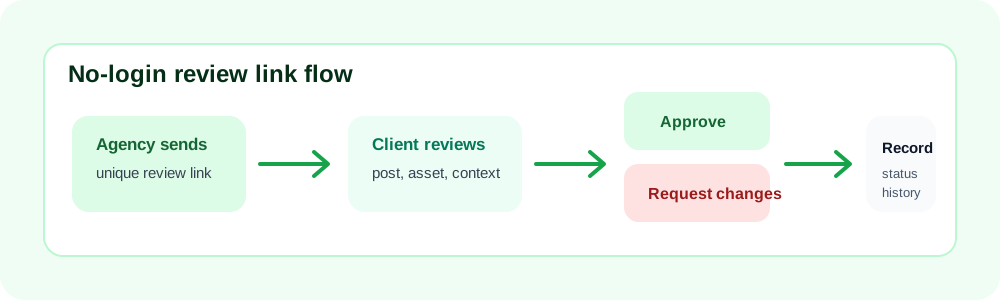
A good client review link is unique to the content, easy to open, clear about the requested decision, and connected to comments, change requests, approval status, and handoff. Example: a client receives one review link for a campaign batch, opens it without a login, sees the current captions and assets, and leaves comments on the exact post instead of replying to a long email thread.
Primary keyword and intent: client review link best practices
This page targets "client review link best practices" with this intent: Best practices: send secure, clear, client-friendly review links.. The angle is client experience plus operational safeguards, which keeps the article distinct from broader Red Falcon HQ pages about client approval software, approval boards, and social media approval workflows.
Review link quality checklist
Unique link for the item or batch. Current version is obvious. Approve and request-changes actions are visible. Review deadline is stated. Link can be revoked or expired when needed.
Step-by-step operating workflow
Step 1: Prepare the content record first. Step 2: Send one link with context and deadline. Step 3: Keep feedback on the review item. Step 4: Resolve comments before approval. Step 5: Close or expire links that should no longer accept decisions.
Decision criteria
Trusted ongoing client: Use no-login link with clear context. because It reduces friction while preserving the record. Sensitive content: Use shorter expiry or stricter access. because The link carries review authority. Old link reused: Create a fresh link. because Reused links can point reviewers to outdated context.
Implementation checklist
Link opens on mobile. Alt text and visible labels are clear. Decision buttons describe actions. Deadline is visible. Client can tell which version is current.
Trade-offs and limitations
The right process for client review link best practices depends on review risk, client comfort, and how many people touch the content. A no-login link lowers friction, but it still needs a clear decision, an owner, and a current version. A detailed approval record protects handoff, but too many fields can slow a small client. Use the smallest workflow that preserves the decision history your team actually needs.
What to document before the work moves forward
For client review link best practices, the useful documentation is not paperwork for its own sake. Record the current content version, client approver, agency owner, review deadline, decision status, unresolved comments, requested changes, and handoff note. A freelancer can keep this lightweight with one board per client. A small agency should keep the same fields across every account so account managers can cover for each other. An internal marketing team should separate stakeholder comments from final approval so campaign work does not stall because several people are reviewing different versions.
Success signals and product fit
This workflow is working when the next action is obvious without a status meeting. The agency can see whether the item is waiting on internal review, waiting on the client, blocked by requested changes, approved, or ready for publishing handoff. The client can understand the request without creating another account or reading a long email chain. Red Falcon HQ fits when the team needs no-login approval links, comments, change requests, reminders, approval status, and handoff records in one place. It does not replace the creative judgment, client relationship, or publishing tool; it protects the review and decision layer between draft and publish-ready content.
Reader-specific example
A freelance social media manager can apply this by creating one review batch per client and checking it twice a week. A small agency can apply it by using the same client review link best practices fields across every account, which makes coverage and reporting easier. A creative team can apply it by separating subjective feedback from approval blockers. A client owner can apply it by collecting stakeholder input internally, then giving one final decision on the current version instead of sending scattered comments from several people. That discipline matters most near publishing deadlines, when unclear ownership can turn a small edit into a delayed launch.
Common mistake to avoid
Reusing the same link for multiple decisions or sending a link with no deadline, owner, or explanation of what is being reviewed. The practical fix is to convert the vague moment into a visible workflow rule: name the owner, classify the feedback, update the current version, and ask for approval only when the reviewer has enough context to decide.
People Also Ask questions answered in context
What is a client review link? For this topic, answer it by looking at the content version, reviewer responsibility, deadline, status, and handoff record together rather than treating the approval as a disconnected message. Should clients need a login to approve content? For this topic, answer it by looking at the content version, reviewer responsibility, deadline, status, and handoff record together rather than treating the approval as a disconnected message. How do you make approval links secure? For this topic, answer it by looking at the content version, reviewer responsibility, deadline, status, and handoff record together rather than treating the approval as a disconnected message. What should be shown on a review link? For this topic, answer it by looking at the content version, reviewer responsibility, deadline, status, and handoff record together rather than treating the approval as a disconnected message.
Internal links and next step
Use the client review link checklist and no-login approval guide before sending the next batch. Relevant next pages include client review link checklist, no-login approval link guide, no-login approval links, client content approval software, social media approval workflow, client content approval checklist, stakeholder feedback consolidation, client approval SLA template, Red Falcon HQ pricing. These links connect this article to the right product, template, and workflow pages without turning the article into a duplicate commercial page.
Practical comparison table
| Method | Works best when | Risk to watch |
|---|---|---|
| Email thread | The approval is rare, simple, and has one reviewer. | Feedback and final decisions can be buried. |
| Spreadsheet | The team mainly needs a calendar and simple status tracking. | The decision record can become detached from the post. |
| Project board | Internal tasks need broad workflow management. | Clients may find the review path too complex. |
| Approval portal | The agency needs comments, decisions, timestamps, reminders, and handoff context. | The request still needs complete content and clear ownership. |
Review link quality checklist
Unique link for the item or batch.
Current version is obvious.
Approve and request-changes actions are visible.
Review deadline is stated.
Link can be revoked or expired when needed.
Decision table for this workflow
| Situation | Recommended action | Why it matters |
|---|---|---|
| Trusted ongoing client | Use no-login link with clear context. | It reduces friction while preserving the record. |
| Sensitive content | Use shorter expiry or stricter access. | The link carries review authority. |
| Old link reused | Create a fresh link. | Reused links can point reviewers to outdated context. |
Field-tested checklist
- Link opens on mobile.
- Alt text and visible labels are clear.
- Decision buttons describe actions.
- Deadline is visible.
- Client can tell which version is current.
Authority references
Implementation guidance by role
Freelancers
Keep the client review link best practices process lightweight. Use one client board, one review link per post or batch, one deadline, and one handoff checklist. Avoid building an agency-scale process before the client volume requires it.
Small agencies
Standardize the approval language across accounts. Every account manager should use the same status labels, review request format, revision rules, and final handoff fields so leadership can see blockers without asking for updates.
Social media managers
Protect the creative context. The client should see the caption, channel, asset, publish date, and campaign note together so feedback is specific enough to act on and approval means the current version is ready.
Marketing teams
Separate internal review from external approval. Internal stakeholders can review strategy, compliance, and tone first; the client or final approver should receive only the version your team is ready to stand behind.
How to know the workflow is working
A healthy approval workflow is visible before a deadline is missed. Your team can see what is waiting on the agency, what is waiting on the client, what needs revision, and what is ready for publishing handoff. Clients understand the request without asking for extra context. The publishing owner can trust the approved version without reading through every comment. If those things are not true, improve the request format before adding more tools or reminders.
Review the process at the end of each content cycle. Look for vague feedback, repeated revision themes, missing assets, late approvals, and posts that were approved but still hard to hand off. Those signals show where the workflow needs a better template, clearer owner, earlier internal review, or stronger client instructions.
Purposeful image briefs
client-review-link-best-practices.png
Placement: near best practices checklist
Alt text: Client review link checklist with unique link, deadline, content context, and decision options
Purpose: Show how to send review links that clients can act on quickly.
Recommended internal links
Send review links clients can actually use
Red Falcon HQ no-login approval links are designed for quick client review while keeping decisions attached to the content record.
Frequently asked questions
What is a client review link?
It is a link that takes the client directly to the content they need to review and approve or return with changes.
Are no-login links safe?
They should be unique, hard to guess, scoped to the item, revocable, and ideally expiring. Do not use broad public links for sensitive approvals.
What should a review link show?
Show the current content, context, deadline, comment area, and clear approve or request-changes actions.